7 Ways to Improve Your SEO Without Hiring an Agency
7 SEO improvements any small business owner can make in an afternoon. Improve website visibility without agency help using free tools and clear steps.

I once paid a mechanic to change my windshield wipers. Not because I couldn’t do it myself. I just assumed there was some trick to it, some specialist knowledge I didn’t have. Turns out you press a little tab, slide the old blade off, and click the new one on. The whole job takes 90 seconds. The mechanic charged me for 30 minutes of labour.
SEO can feel exactly like that. You’re paying a monthly retainer, reports arrive in your inbox with graphs and acronyms, and you nod along without being entirely sure what moved. I’ve talked to enough founders and small business owners to know the feeling is common: you suspect some of the work being done for you is work you could handle yourself, but you don’t know which parts. So you keep paying.
Here’s the honest version. Some SEO work genuinely needs a specialist. And some of it you can do yourself in an afternoon, without hiring writers or agencies, without touching code, without learning a new platform. This article covers the second category.
You can improve SEO without hiring an agency by making 7 changes yourself this afternoon: rewriting title tags and meta descriptions, connecting Google Search Console, fixing your heading structure, adding direct answer paragraphs, auditing internal links, running a page speed check, and updating one existing page. None of these require coding or specialist knowledge, only CMS access and free tools.
Most of the highest-impact on-page SEO improvements require nothing more than CMS access and a free Google tool. Title tags, meta descriptions, heading structure, internal links, direct answer paragraphs, and page speed are all self-serve. The tasks that genuinely need an agency, like large-scale link building and technical audits, are a smaller list than most people assume. Start with the quickest wins and work up.
Which SEO Tasks Actually Need an Agency
Some SEO tasks genuinely benefit from professional help. Large-scale link building campaigns, competitive keyword strategy for high-volume terms, penalty recovery, and technical audits across hundreds of pages all require tools, time, and relationships that most lean marketing teams don’t have in-house. If your agency is doing that work, they’re earning their fee.
But other tasks are genuinely self-serve. On-page copy, title tags, meta descriptions, heading structure, internal linking, Google Business Profile updates, and basic content improvements don’t require a specialist. Google’s own documentation confirms that small businesses with straightforward websites can handle these without hiring anyone, a point Google Search Central makes explicitly in its guidance on whether you need an SEO.
The question worth asking: is your agency doing the specialist work, or the self-serve work? If you’re not sure, it’s worth comparing what SEO agencies typically charge against the tasks on your monthly report. That comparison alone can clarify whether you’re paying for expertise or for tasks you could handle this afternoon. The SEO tasks that don’t need an agency are the ones covered in the 7 tips below.
Tip 1: Rewrite Your Title Tags and Meta Descriptions
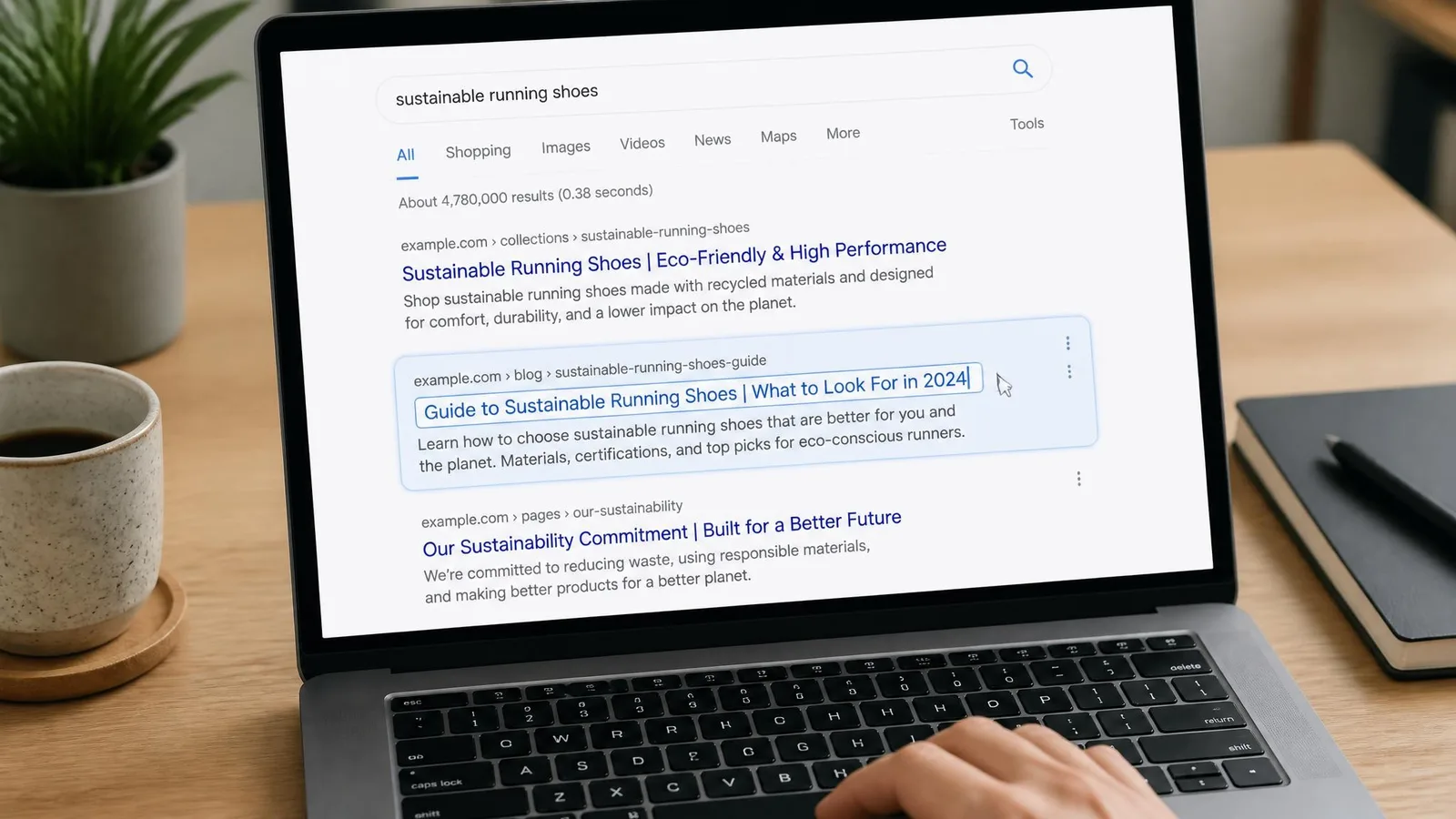
Title tags and meta descriptions are the first thing a searcher sees in Google results. They’re the headline and the preview text that convince someone to click, or to scroll past. A well-written, keyword-relevant title tag is the first line of content that ranks or doesn’t, and rewriting a weak one can lift your click-through rate without changing your ranking position at all. These are easy SEO wins for beginners because the change is immediate and the effort is minimal.
The practical rule: keep title tags under 60 characters and meta descriptions under 160 characters. Beyond those lengths, Google truncates the text, and your message gets cut off mid-sentence.
You don’t need a developer. WordPress, Shopify, Webflow, and Squarespace all let you edit these fields directly. No code involved. Open Google Search Console, go to the Performance report, and filter for pages with high impressions but low click-through rates. Those are the title tags to rewrite first. If you’re also wondering why your blog posts aren’t ranking, weak title tags are often one of the first culprits.
Time estimate: under 1 hour for a 10–15 page site.
How to Fix Meta Descriptions Yourself
- Find the pages that need attention. In Google Search Console, sort the Performance report by impressions and look for pages with a click-through rate below 3%. Those are your quickest wins.
- Write a new meta description. Include the page’s main keyword and a clear reason to click. A strong meta description reads like a single sentence of ad copy that tells the searcher exactly what they’ll get, not a vague summary of the page.
- Save and check back. Update the description in your CMS and revisit your click-through rates in 2–3 weeks. Avoid duplicate meta descriptions across pages; unique descriptions improve your chances of the right message showing for the right query.
Tip 2: Connect Google Search Console and Read What It’s Telling You
Google Search Console is free, it’s made by Google, and it shows you the real-world results of your SEO: which queries are bringing people to your site, which pages are getting impressions but not clicks, and whether Google has found problems crawling your pages. It’s not vanity metrics. It’s a direct line to how your site is actually performing in search.
Most small business owners either haven’t connected it or connected it years ago and never looked at it again. That’s a gap worth closing in 30 minutes.
Three reports to check immediately: Performance (the queries driving impressions and your click-through rates), Pages (which pages Google can’t crawl or index), and Core Web Vitals (basic speed and usability signals). Google Search Central identifies this as the foundational diagnostic tool for anyone doing their own SEO.
Time estimate: 30 minutes to connect and read your first report.
Using Google Search Console as a Beginner
Start with the Performance report. Sort by impressions, then look for pages sitting in positions 5–20 with a click-through rate below 3%. Those pages are already visible to Google but not compelling enough for searchers to click. They’re your quickest wins.
If you haven’t verified your site yet, setup takes about 10 minutes using the HTML tag method in most CMS platforms. Don’t try to action everything at once. Pick one problem from one report and fix it before moving to the next.
Tip 3: Fix Your Heading Structure So Search Engines Can Follow It
Heading tags (H1, H2, H3) are how search engines and AI answer engines parse the structure of a page. They’re the structural foundation of search and AI visibility. If a page has no H1, or jumps from H1 straight to H3, the page becomes harder for both Google and AI engines to read, index, and quote. DIY SEO for small businesses starts here because this is a fix that costs nothing and compounds across every page on your site.
The practical rule: 1 H1 per page (the page title), H2s for main sections, H3s for subsections. Every page on your site should follow this hierarchy.
You can audit this without any tool. Right-click any page, select “View Page Source,” and search for h1. If there’s more than one, or none, that’s worth fixing.
For AI answer engines specifically, a clear heading structure helps the engine extract your content as a quoted chunk in a generated answer. Pages without clear structure are harder for AI to parse and cite. If you want to go deeper on AI search visibility for B2B founders, heading hierarchy is the structural prerequisite that underpins everything else.
Time estimate: 1–2 hours to audit and fix a 10-page site.
Tip 4: Add a Direct Answer Paragraph to Your Most Important Pages
AI answer engines and Google’s featured snippets favour pages that answer a question directly, in plain language, within the first 150 words. This isn’t a technical change. It’s a writing choice.
The format is simple: state the question your page answers, then answer it in 40–60 words without preamble. This paragraph becomes the chunk an AI engine is most likely to quote. The result is AI-ready content, quotable and clear from the first paragraph.
Most pages bury the answer under several paragraphs of context, background, or qualifications. Moving the answer up is the change, and it takes under 1 hour per page. A good starting point is knowing how to find the questions your customers are actually searching so you can match your direct answer paragraph to real queries.
This technique also helps human visitors. People decide within seconds whether a page is worth reading. A clear answer at the top tells them they’re in the right place.
Time estimate: under 1 hour for your 3–5 most important pages.

Tip 5: Audit and Improve Your Internal Links
Internal links help search engines understand which pages on your site matter most and how your content connects. A page with no internal links pointing to it is effectively invisible to search engines, regardless of how good the content is.
The self-serve audit: read through your 5 most important pages and ask whether each one links naturally to at least 2 or 3 other relevant pages on your site. If it doesn’t, add the links.
Anchor text matters. “Click here” tells a search engine nothing. “How to structure a blog post for SEO” tells it exactly what the linked page covers. Use descriptive anchor text that reflects the content of the destination page.
Internal linking also surfaces older content that might otherwise go unread, extending the reach of content you’ve already invested in. It’s one of the quietest drivers of organic growth because it compounds over time as your site grows.
Time estimate: 1–2 hours for a thorough audit of a 10–20 page site.
Tip 6: Run a Page Speed Check and Fix the Easy Wins
Google’s PageSpeed Insights is free, requires no login, and gives you a scored report on how fast your pages load on mobile and desktop. Paste your URL at pagespeed.web.dev and read the report.
The easy wins to action yourself: compress oversized images (many CMS platforms have a built-in compression tool or a free plugin), remove unused scripts if your CMS allows it, and enable browser caching if your host offers a one-click option. Site speed, mobile usability, and crawlability are technical SEO changes a business owner can address using free tools without hiring a specialist, a point Cutting Edge PR’s 2026 guidance on technical SEO for non-experts reinforces directly. The important thing is knowing which findings to act on and which require a developer.
The things to hand off: server-side rendering issues, Core Web Vitals failures tied to JavaScript execution, and anything the report labels as “eliminate render-blocking resources.” Those are developer tasks, not afternoon projects.
Time estimate: 30 minutes for the check and the easy fixes.
Tip 7: Update One Existing Page Instead of Writing Something New
Publishing more content isn’t always the answer. A page that already has some ranking history, some impressions, and some links pointing to it is much closer to performing well than a blank page. Updating an existing page is often higher-leverage than starting from scratch.
The update checklist for a single page: add a direct answer paragraph at the top, fix the heading structure, update any outdated information, add 2–3 internal links, and rewrite the title tag if it’s weak. That’s a meaningful update, and it’s the kind of SEO change small businesses can make without waiting for an agency.
For AI search visibility specifically, updating an existing page with clear structure and a direct answer paragraph is often more effective than publishing a new page. AI engines weight established pages with crawl history more heavily than brand-new ones. The goal is to show up in Google and AI answers, not just to rank on page 2 and hope someone scrolls. If you want to go deeper on how to show up in AI search results, I’ve written a separate guide on how to show up in AI answers, not just Google.
Time estimate: 1–2 hours for a thorough update of 1 page.

Frequently Asked Questions
What SEO can I do myself?
You can handle title tags, meta descriptions, heading structure, internal linking, direct answer paragraphs, and basic page speed checks yourself. These are practical content and structural changes that require only CMS access. No coding knowledge needed.
Do I need an SEO agency?
Not for the self-serve tasks above. Where agencies earn their fee is link building at scale, technical audits for large or complex sites, and competitive keyword strategy for high-volume terms. The honest answer: it depends on which tasks you’re paying them for.
How do I check if my website is SEO friendly?
Start with Google Search Console for crawl health and indexing issues. Run your URL through PageSpeed Insights for speed scores. Then do a manual heading structure check by viewing your page source and searching for h1. Those 3 checks cover the basics.
How long does it take to see results from DIY SEO changes?
Title tag and meta description changes can show click-through improvements within 2–4 weeks. Content and structural changes typically take 1–3 months to reflect in rankings. SEO compounds over time, so consistency matters more than speed.
Do I need to understand code to improve my SEO?
No. Every tip in this article requires only CMS access. You won’t need to write, edit, or understand code to make any of these improvements.
Start With the Quickest Wins
You don’t need to hand everything to an agency to make meaningful progress on SEO this week. Start with the changes that take the least time, like rewriting title tags, connecting Google Search Console, and fixing meta descriptions. Then work up to the content and structural changes that deliver real-world results over the following weeks. That’s a quick wins SEO strategy you can actually execute.
cpywrk
Every article here was made by cpywrk itself: researched, drafted, and run through the same quality and GEO checks the product applies to customer content, then read and approved by a person before it publishes. The blog is the proof.
Related reading
When to Use AI for Content: 7 Jobs to Delegate, 3 to Keep
Discover which content tasks AI handles reliably and which three you must keep yourself, based on where AI is confidently wrong about real-world facts.
7 min read
8 Ways to Keep Your Brand Voice in AI Copywriting
AI drafts default to generic. Here are 8 interventions, from prompt setup to post-draft editing, that keep your brand voice in AI copywriting intact.
6 min read
6 Checks to Run Before Publishing Anything a Machine Drafted
Run these 6 checks before publishing AI content to catch hallucinations, brand voice drift, broken links, and the errors fluency alone won't reveal.
7 min read